Projector Throw Ratio Chart
Projector throw ratio chart for golf simulators: throw distance for 8, 10, 12, and 14 ft screen widths at throw ratios from 0.5 to 1.2, plus the simple formula to use.
Projector placement in a golf simulator comes down to one simple formula: throw distance = throw ratio x image width. A short-throw projector with a ratio between 0.5 and 0.8 is ideal because it sits close to the screen, clears the golfer's swing, and avoids casting a shadow on the image. The chart below gives the exact throw distance for common screen widths of 8, 10, 12, and 14 feet across throw ratios from 0.5 to 1.2, so you can find where your projector needs to mount or which ratio fits your room.
Shop projectors & mounts
A short-throw projector, a ceiling mount to place it, and the impact screen it projects onto.
-
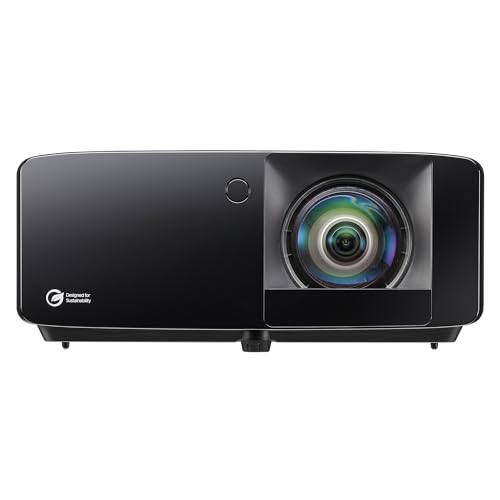 Short-throw projector Optoma GT2400HDR Short Throw Laser Projector
A golf-ready 1080p laser with 4,200 lumens and a roughly 0.5 throw ratio, so it fills a wide screen from a short ceiling mount.
-
 Ceiling mount Mount-It! PRO Heavy Duty Projector Ceiling Mount
A full-motion mount with 77 lb capacity and a 29 to 45 inch drop, made to hang a projector below an enclosure header at the right throw distance.
-
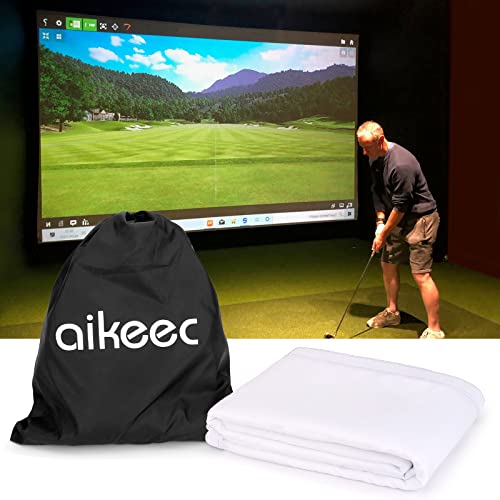 Impact screen aikeec 7mm Thickened Impact Screen with Grommets
A thickened ultra-clear hitting screen with reinforced grommets, the projection surface your short-throw beam lands on.
Prices update on Amazon and change often. As an Amazon Associate we earn from qualifying purchases at no extra cost to you.
The throw ratio formula
Throw ratio is the distance from the projector lens to the screen divided by the width of the projected image. To find how far back a projector must sit, multiply its throw ratio by your screen width. To find the ratio you need, divide your available mounting distance by your screen width. For example, a 0.65 ratio on a 12-foot screen needs 7.8 feet of distance. Run your own numbers through the projector throw calculator.
Projector throw distance chart
Each cell is the throw distance in feet, calculated as throw ratio times screen width. Ratios of 0.5 to 0.8 (the short-throw range ideal for simulators) are the rows to focus on.
| Throw ratio | 8 ft screen | 10 ft screen | 12 ft screen | 14 ft screen |
|---|---|---|---|---|
| 0.5 (ultra short-throw) | 4.0 ft | 5.0 ft | 6.0 ft | 7.0 ft |
| 0.65 (short-throw) | 5.2 ft | 6.5 ft | 7.8 ft | 9.1 ft |
| 0.8 (short-throw) | 6.4 ft | 8.0 ft | 9.6 ft | 11.2 ft |
| 1.0 (standard) | 8.0 ft | 10.0 ft | 12.0 ft | 14.0 ft |
| 1.2 (long-throw) | 9.6 ft | 12.0 ft | 14.4 ft | 16.8 ft |
Why short-throw wins for simulators
Look at the 1.0 and 1.2 rows: a standard projector on a 12-foot screen needs to sit 12 to 14 feet back, which is exactly where the golfer stands and swings. That creates two problems, the player blocks the light and casts a shadow on the image, and the projector is in harm's way of a wayward club or ball. A short-throw projector at 0.5 to 0.8 puts the unit just 6 to 10 feet out on the same screen, where it can be ceiling-mounted in front of the swing zone and out of the beam path.
That is why nearly every dedicated simulator uses a short-throw projector mounted to the ceiling, angled down at the screen, sitting in front of the hitting position. The shorter the throw ratio, the closer the projector can sit, and the easier it is to keep both the shadow and the projector clear of the swing.
How to choose your ratio
Start with your screen width, which is set by your room width and swing clearance. Then measure how far in front of the screen you can realistically ceiling-mount a projector without it entering the swing zone. Divide that distance by your screen width to get the throw ratio you need, then shop for a projector whose published throw ratio range includes that number. Because most projectors have a zoom range rather than a single fixed ratio, you usually have some flexibility to fine-tune placement after mounting.
For full picks and brightness, resolution, and mounting guidance, see our best golf simulator projectors roundup. Confirm the screen will fit your wall first with the room size chart, then lock in placement with the projector throw calculator.
A note on accuracy
The throw distances above are calculated directly from the formula and are mathematically exact for the listed ratios and widths. Real projectors, however, publish a throw ratio range and include optical zoom, so treat each row as the center point and use the projector's own specifications and zoom to dial in the final mounting position. Always verify against the specific model's manual before drilling mounting holes.
Golf Sim Build Planner
Room-fit worksheet, gear checklist, budget tracker, and wiring and lighting plan, in one printable planner that takes your build from idea to first swing.
Frequently Asked Questions
What throw ratio do I need for a golf simulator?
Most golf simulator builds want a short-throw projector with a throw ratio between about 0.5 and 0.8. A ratio in this range lets the projector sit close to or above the screen so it clears the golfer's swing and avoids casting a shadow on the image. A standard or long-throw projector with a ratio of 1.2 or higher would have to sit far back, right where the golfer stands, which is why short-throw is the simulator standard.
How do I calculate projector throw distance?
Throw distance equals the throw ratio multiplied by the image width. So a projector with a 0.65 throw ratio displaying a 10-foot-wide image needs to sit 6.5 feet from the screen. Flip it around to find the ratio you need: divide your available distance by your screen width. If you can mount the projector 8 feet back on a 12-foot screen, you need a ratio near 0.67. Our throw calculator does the math for you.
Why is short-throw better for golf simulators?
Short-throw projectors sit close to the screen, often ceiling-mounted just in front of it, so they stay out of the golfer's swing path and avoid the shadow problem. With a long-throw projector, the unit must sit far back where the player stands, meaning the golfer blocks the beam and casts a shadow on the image, or risks hitting the projector. A short-throw ratio of 0.5 to 0.8 keeps the projector clear and the image clean.
Can I use a regular home theater projector?
You can, but most home theater projectors have throw ratios around 1.2 to 1.5, which forces a long mounting distance that conflicts with the swing zone in a typical simulator room. If your room is unusually deep and you can mount the projector high and far enough back to clear the swing without shadowing, a standard-throw unit can work. In most simulator rooms, though, a short-throw projector is the practical choice.
What screen width should I plan for?
Common simulator screen widths run from about 8 to 14 feet, with 10 to 12 feet being typical for a dedicated room. Wider screens are more immersive but demand more wall space and a brighter, higher-resolution projector to fill them cleanly. Match your screen width to your room width first, leaving swing clearance on both sides, then choose a projector whose throw ratio puts the unit where you can actually mount it.
Are these throw distances exact?
The distances in the chart are calculated directly from the formula throw distance equals ratio times width, so the math is exact, but real projectors have a throw ratio range and zoom rather than a single fixed number. Always check the specific projector's published throw ratio range and use its zoom to fine-tune placement. Our projector throw calculator lets you enter your exact screen width and mounting distance to find the ratio you need.
Building a golf sim?
Use our free calculators and guides to size the room, the gear, and the budget.
Build Planner: $39