Best Budget Golf Simulators (2026)
Build a real golf simulator on a budget in 2026: complete sub-$2,000 and sub-$5,000 setups around the Garmin R10 or Rapsodo MLM2PRO, plus projector, net, and mat picks.
You can build a genuinely useful golf simulator on a budget, and the smartest starting point is a radar launch monitor. The Garmin Approach R10 anchors most sub-$2,000 builds, and the Rapsodo MLM2PRO is the step-up that adds measured spin and swing video for the sub-$5,000 tier. Around either one you add a budget 1080p projector, a hitting net or DIY impact screen, and a quality mat. Below are six real components that combine into complete budget bundles, plus an honest look at exactly what budget gets you and where it falls short.
Best Budget Golf Simulator Components for 2026

Garmin Approach R10 Portable Launch Monitor
The budget radar darling: tracks club and ball speed, launch angle, and spin via the Garmin Golf app, with 42,000+ virtual courses on subscription and up to 10 hours of battery.

Rapsodo MLM2PRO Launch Monitor
Doppler radar plus dual cameras capture 15 metrics including measured spin, with 30,000+ simulator courses and impact video on the premium tier. The step-up budget pick.

HAPPRUN Native 1080P Home Projector
An inexpensive native 1080p projector for a first sim build; bright enough for a darkened room and good enough to learn what features you actually want before upgrading.

KLAODOT Golf Net 10x7 with Practice Mat
A 10x7 ft hitting net with target and bundled mat, the cheapest way to catch balls safely. Pair it with a launch monitor for data-only practice or build a DIY screen around it.
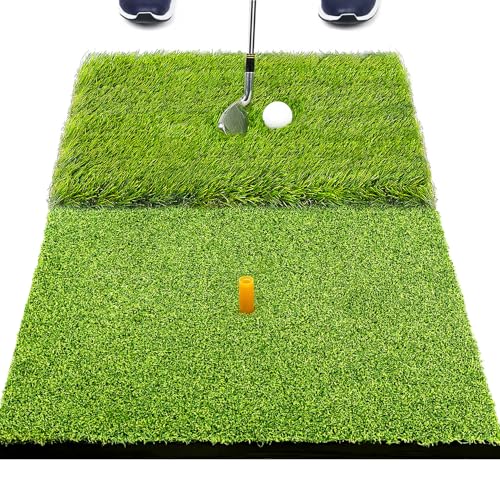
SAPLIZE Foldable 2-in-1 Golf Hitting Mat
A compact 23 x 16 in foldable mat with rough and fairway turf for hitting and chipping; the entry point if you just need a forgiving surface to swing off indoors.

Bearwill 5x4 ft Elite Golf Hitting Mat
A 31 mm high-elasticity 5x4 ft mat that stands up to driver swings without jarring your wrists, the upgrade most budget builders make first after a small foldable mat.
A golf simulator is really just four parts working together: a launch monitor that reads your shot, a display that shows ball flight and courses, a surface to hit from, and something to stop the ball. The trick to building cheap is spending your money on the launch monitor, which determines your data quality, and going lean on everything else. The two bundles below show how the same core pieces scale from an entry rig to a more immersive one. To estimate your own total before you buy, run the numbers in our golf sim cost calculator.
Quick comparison
| Component | Role | Best for | Price |
|---|---|---|---|
| Garmin Approach R10 | Launch monitor (radar) | Entry sub-$2,000 builds | $399.98 |
| Rapsodo MLM2PRO | Launch monitor (radar + cameras) | Step-up sub-$5,000 builds | $599.98 |
| HAPPRUN 1080P Projector | Display | First projected image, dark room | $84.94 |
| KLAODOT Net + Mat | Ball containment | Cheapest catch, DIY screen base | $59.99 |
| SAPLIZE Foldable Mat | Hitting surface | Smallest spaces, lowest cost | $26.19 |
| Bearwill 5x4 Mat | Hitting surface | Driver-ready upgrade | $129.99 |
Amazon pricing shifts often, so treat these as a snapshot. The bundles below assume you already own a computer, tablet, or phone to run the launch monitor software, which keeps the cost down.
The sub-$2,000 build
For around $1,400 to $1,800 all in, the entry build is: Garmin Approach R10 launch monitor, the HAPPRUN 1080p projector (or skip the projector and use a laptop or TV to save money), the KLAODOT 10x7 net as your catch, and the Bearwill 5x4 mat so driver swings do not punish your wrists. Add a cheap impact screen or hang an old white sheet behind the net if you want a projected image. Run it on the free Garmin Golf app, with a subscription if you want full course play.
This is the rig that proves the concept. The R10 gives you honest club and ball speed, launch angle, and direction, the net keeps things safe, and the mat lets you swing every club. You will not get tour-grade spin or a cinema-bright picture, but you will get real, repeatable practice and the ability to play simulated rounds. Most people who start here keep using it for years and only upgrade one piece at a time.
The sub-$5,000 build
Stepping up to roughly $3,000 to $4,500 buys better data and a more immersive screen without entering premium-monitor territory. Swap the R10 for the Rapsodo MLM2PRO, which adds dual cameras, measured spin, and impact video so your short-game and shot-shape numbers are far more trustworthy. Move to a brighter 1080p or entry 4K short-throw projector, build a proper tensioned impact screen inside an enclosure (the KLAODOT net can still serve as the safety backstop), and step the mat up to a premium 4x5 or 4x9 surface. Budget for GSPro or E6 Connect if you want the best simulated courses.
The big leap from the sub-$2,000 rig is not the picture, it is the spin data. Measured spin makes wedge and iron numbers usable for real practice rather than just trend-watching. The MLM2PRO still needs ball flight room as a radar-camera hybrid, so plan your depth accordingly with our golf sim room size calculator before you commit to an enclosure.
Picking the launch monitor
Your launch monitor is the heart of the build and where your money should go. Both budget picks are radar (doppler) units, which means they read the ball as it flies and want a few feet of clearance in front of you, unlike photometric camera units that sit to the side and need less depth. The R10 is the value champion for general practice and casual rounds. The MLM2PRO is the one to buy if measured spin and swing video matter to you. If you want to weigh the sub-$1,000 field in detail, see our guide to the best launch monitors under $1,000.
Net versus DIY impact screen
A net is the cheapest, simplest catch and is all you need for data-only practice with the monitor on a laptop. If you want the full projected course view, you will build or buy an impact screen, and a net behind it adds a safety margin for mishits. DIY screens save real money but ripple more than commercial ones and demand careful tensioning. For options that hold up to repeated driver strikes, see our roundup of the best golf simulator nets.
How we chose
We did not test these products in a built simulator. Instead we compared published manufacturer specifications, launch monitor metrics and accuracy claims, projector resolution and brightness, mat thickness and construction, net dimensions, against patterns in verified owner reviews on Amazon, then weighed them for how well they combine into a working budget rig. We leaned toward components that earn consistent praise for reliability and value, since a budget build only works if each cheap piece actually holds up.
Spin accuracy, brightness, and durability are the honest weak points of any budget setup, so we called those tradeoffs out rather than hiding them. Prices, runtimes, and dimensions come from manufacturer and retailer listings and shift over time, so treat the bundle totals as estimates and confirm current pricing before you buy.
Buying tips
Spend on the launch monitor first, because it sets the ceiling on your data quality, then add the cheapest display and catch that meet your goals. If you only want practice numbers, skip the projector and run the app on a laptop into a net. Measure before you buy: confirm your ceiling clears a full driver swing (about 9 ft practical minimum) and that you have room for a radar unit to read ball flight. Our projector throw calculator helps you place a short-throw projector so it clears your swing and avoids shadows.
Finally, upgrade one piece at a time. Start with the R10, net, and a solid mat, live with it for a season, then add projection, a tensioned screen, or a step-up monitor where you actually feel the limits. That approach gets you swinging sooner and spends your money where it earns the most. Run your full plan through our golf sim cost calculator to see the total before you commit.
Golf Sim Build Planner
Room-fit worksheet, gear checklist, budget tracker, and wiring and lighting plan, in one printable planner that takes your build from idea to first swing.
We also have full reviews of each: OptiShot 2 review and FlightScope Mevo Gen2 review.
Frequently Asked Questions
Can you build a real golf simulator for under $2,000?
Yes. A capable budget setup pairs a Garmin Approach R10 (about $400) with a basic 1080p projector, a hitting net or DIY impact screen, and a quality mat. That package lands well under $2,000 and gives you on-screen ball flight, simulated courses, and real practice data. You sacrifice the spin accuracy and polish of premium camera units, but for learning and off-season reps it is genuinely useful and a huge step up from hitting into a bare net.
Is the Garmin Approach R10 accurate enough for a home sim?
For the price, the R10 is impressively good at the basics: club head speed, ball speed, launch angle, and launch direction are all measured directly. As a radar unit it estimates spin rather than measuring it, so chip and wedge numbers wander more than driver numbers, and it needs a few feet of ball flight to read well. Treat it as a strong practice and trend tool rather than a tour-grade fitting device, and you will get real value from it.
Should I get the Garmin R10 or the Rapsodo MLM2PRO?
Both are radar-based budget monitors. The R10 is cheaper and great for general practice and casual simulated rounds. The MLM2PRO adds dual cameras, measured spin, and impact video, so its short-game and shot-shape data is more trustworthy, at a higher price. If you mostly want to practice and play virtual courses on a budget, start with the R10. If spin accuracy and swing video matter to you, the MLM2PRO is the better long-term buy.
Do I need a projector, or can I just use a TV or laptop?
You do not strictly need a projector. Many budget builders run the launch monitor app on a laptop or TV and skip the screen entirely, hitting into a net while watching data and ball flight on the display. A projector and impact screen create the immersive full-size course view, but they add cost and require a darker room and proper throw distance. Start with net plus laptop if money is tight, then add projection later.
What does a budget simulator give up versus a premium one?
Mostly accuracy, brightness, and durability. Budget radar monitors estimate spin instead of measuring it, cheap projectors are dimmer and lower contrast, thin mats wear faster and transmit more shock, and DIY screens ripple more than tensioned commercial ones. Software is often the bundled app rather than GSPro or E6 Connect. None of that stops a budget rig from being fun and useful; it just means the data and image are good, not flawless.
How much room do I need for a budget golf simulator?
The same as any sim: about 10 ft wide and 12 ft deep at a workable minimum, with roughly 9 ft of ceiling for a full driver swing. Radar monitors like the R10 want a few extra feet of ball flight in front of you to read the shot. Always test your own full swing before committing, and use our golf sim room size calculator to confirm your space handles your height and swing.
Building a golf sim?
Use our free calculators and guides to size the room, the gear, and the budget.
Build Planner: $39