Best Golf Simulator Under $3,000 (2026)
The best golf simulator under $3,000 for 2026: a complete Garmin R10 build with short-throw projector, enclosure, mat, and PC, plus honest tradeoffs and sizing tips.
The best golf simulator you can build for under $3,000 pairs the Garmin Approach R10 radar launch monitor with a BenQ TH671ST short-throw projector, a complete ANYTHING SPORTS screen-and-frame enclosure, a GoSports Elite hitting mat, and an entry RTX gaming laptop. That stack lands near $2,900 and plays real golf on GSPro or the R10's bundled courses. You give up camera-grade accuracy and a 4K picture, but every part is honest, durable, and upgradeable. Here is the full build, the comparison table, and how to choose.
Best Golf Simulator Build Under $3,000

Garmin Approach R10 Portable Launch Monitor
The budget radar darling: club and ball speed, spin, launch angle, and built-in courses driving the whole sub-$3,000 build.

BenQ TH671ST 1080p Short-Throw Gaming Projector
A 0.69 throw ratio puts a 100-inch image about 5 feet back, so it clears your swing and stays bright at 3,000 lumens.

ANYTHING SPORTS Complete Golf Simulator Enclosure Package
A 4K-ready impact screen plus frame in one box, the fastest way to a finished hitting bay without sourcing parts separately.
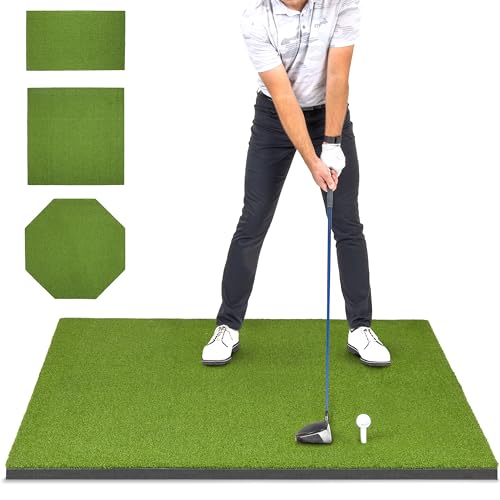
GoSports Golf Hitting Mat, Elite 5 x 4 ft
A 15 mm commercial-style turf pad big enough for a full stance, durable enough for daily driver swings on a budget.
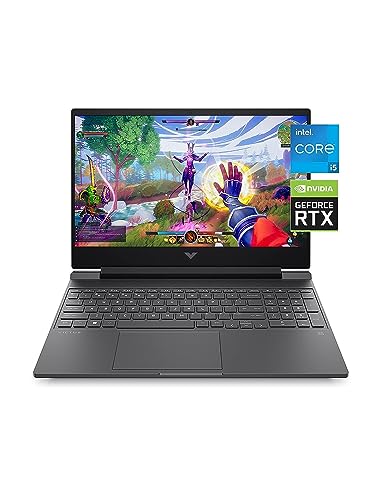
HP Victus 15 Gaming Laptop, RTX 3050
Runs the R10's bundled apps and entry GSPro settings, the cheapest reliable way to push a sim image to a projector.

Putt-A-Bout Grassroots Par Three Putting Green
A 9 by 3 ft three-hole green that adds short-game practice for under $50 once your hitting bay is built.
At this budget the launch monitor is the heart of the system and the place you should spend most carefully. The R10 is a radar (Doppler) unit, which means it reads the ball after impact and needs a few feet of flight to work well. That makes it a fantastic value for full swings and a sensible compromise for a first simulator. The projector, enclosure, mat, and PC around it are chosen to keep the picture clean, the swing safe, and the software running without blowing the budget.
The under-$3,000 build at a glance
| Component | Pick | Why it makes the build | Price |
|---|---|---|---|
| Launch monitor | Garmin Approach R10 | Radar accuracy that punches above its price | $399.98 |
| Projector | BenQ TH671ST | 0.69 short throw clears your swing | $949.00 |
| Enclosure | ANYTHING SPORTS package | Screen plus frame in one box | $699.99 |
| Hitting mat | GoSports Elite 5 x 4 ft | Full-stance turf that lasts | $149.99 |
| Computer | HP Victus 15 (RTX 3050) | Runs GSPro at entry settings | $739.99 |
| Putting green | Putt-A-Bout Par Three | Optional short-game add-on | $39.99 |
Amazon pricing moves, so treat these as a snapshot. The core hitting setup (monitor, projector, enclosure, mat, PC) comes to roughly $2,940, leaving a little room for HDMI cables, a mount, and a few balls. Want to model the full cost with software and extras? Run the numbers in our golf simulator cost calculator.
Garmin Approach R10 (Best Launch Monitor)
The R10 is the reason a sub-$3,000 simulator is even possible. It captures club head speed, ball speed, spin, launch angle, and launch direction, then feeds that into the Garmin Golf app, E6, or GSPro. It is portable, runs on a phone or a PC, and includes home tee-off courses out of the box. The honest tradeoff is that it is radar based: it wants a few feet of ball flight to read cleanly, and very short wedge shots indoors can read inconsistently. For full swings, it is remarkably accurate for the price, which is exactly what most first-time builders need.
BenQ TH671ST (Best Projector)
A short-throw projector is non-negotiable in a tight golf bay, and the TH671ST is the value benchmark. Its 0.69 throw ratio fills a 100-inch screen from about 5 feet, so a ceiling mount sits ahead of the hitting zone and your body never casts a shadow. At 3,000 lumens and native 1080p it looks crisp on an impact screen in a room with some ambient light. Use our projector throw calculator to confirm the exact mount distance for your screen width before you drill anything.
ANYTHING SPORTS Enclosure (Best Enclosure)
Sourcing a screen, frame, and side netting separately is the most error-prone part of a first build. This package ships a 4K-ready impact screen with its frame together, so the dimensions match and you are not guessing at conduit sizes. The screen absorbs full-speed shots and gives the projector a clean, flat surface. If you want to compare a few finished kits, our best golf simulator enclosures roundup breaks down the leading options by size and safety.
GoSports Elite Mat and the rest
The GoSports Elite 5 by 4 ft mat gives you a full stance on durable 15 mm turf that shrugs off daily driver swings, a real step up from the thin folding pads. The HP Victus laptop with an RTX 3050 is the cheapest machine that runs GSPro at playable settings while driving the projector. And the optional Putt-A-Bout green adds short-game reps for under $50. Together they round out a complete, honest room rather than a launch monitor sitting on the floor.
How we chose
We did not set this build up in a test bay. Instead, we compared published manufacturer specifications, throw ratios, lumen ratings, screen dimensions, launch-monitor accuracy figures, and software compatibility, and weighed them against patterns in verified owner reviews on Amazon. We prioritized parts that fit a real room, played nicely together, and carried forward into future upgrades, rather than the absolute cheapest item in each category.
We were deliberately conservative about accuracy. Budget radar units like the R10 are excellent for the money but are not a Trackman, and we said so. We also favored a true short-throw projector over a cheaper standard one because shadowing ruins a tight bay. Every price and spec here comes from manufacturer listings, so treat them as estimates and confirm your own room dimensions before buying.
Buying tips for a sub-$3,000 simulator
Start with your ceiling. A full driver swing needs roughly 9 ft of practical clearance and 10 ft to feel comfortable, so measure with a club in hand before anything else. Next, confirm width and depth: about 10 ft wide and 12 ft deep is the workable floor, and radar units like the R10 want extra depth behind the ball. Our room size calculator turns those measurements into a clear go or no-go.
Spend your money in the right order. The launch monitor and projector make or break the experience, so do not cut corners there to save on a mat you will replace anyway. Buy the short-throw projector for clearance, not the brightest cheap unit. And plan one upgrade path: most builders eventually move from the R10 to a photometric monitor like SkyTrak, so see how the next tier looks in our best golf simulator packages guide and our best launch monitors roundup before you commit.
Golf Sim Build Planner
Room-fit worksheet, gear checklist, budget tracker, and wiring and lighting plan, in one printable planner that takes your build from idea to first swing.
Frequently Asked Questions
Can you really build a good golf simulator for under $3,000?
Yes, and it will play well. A Garmin Approach R10 launch monitor, a short-throw 1080p projector, a complete screen-and-frame enclosure, a quality hitting mat, and an entry gaming laptop come to roughly $2,900. You give up the camera-based accuracy and 4K image of higher tiers, but the R10 reads real ball and club data and pairs with GSPro or its bundled courses for genuine practice and play.
Is the Garmin R10 accurate enough for a home simulator?
For the money it is excellent, with the honest caveat that it is a radar unit. Garmin lists ball speed accuracy of about plus or minus 1 mph and club head speed of plus or minus 3 mph. Radar needs several feet of ball flight behind the screen to read well and can wander on short, soft wedge shots indoors. Full swings track reliably, which is why the R10 anchors most budget builds.
Why a short-throw projector instead of a cheaper standard one?
In a tight room a standard projector either sits behind you, where your body casts a shadow, or too far back to fit. A short-throw model like the BenQ TH671ST has a 0.69 throw ratio, so it fills a 100-inch screen from roughly 5 feet and can mount on the ceiling ahead of the hitting area. That clearance is the difference between a clean image and a shadow every swing.
Do I need a gaming PC, or can I use my phone?
For basic R10 practice and the Garmin Golf app, a phone or tablet works. To run GSPro or E6 Connect on a projector at playable frame rates you need a Windows PC with a dedicated GPU. An entry RTX 3050 laptop like the HP Victus handles GSPro at modest settings and doubles as the machine that drives the projector, which is why we include one in the under-$3,000 build.
What room size do I need for this build?
Plan on about 10 ft wide, 12 ft deep, and 9 ft of ceiling as a workable minimum, with 10 ft of height far more comfortable for a full driver swing. Radar units like the R10 want extra depth behind the ball to read flight. Always test your own full swing in the space first, and use our golf sim room size calculator to confirm the bay fits before you buy.
What is the easiest thing to upgrade later?
Start with the launch monitor. Moving from the R10 to a photometric unit such as SkyTrak adds the biggest jump in spin and short-game accuracy. After that, a brighter 4K projector and a thicker commercial mat are the next worthwhile steps. Because the enclosure, mat, and PC all carry forward, you can spread upgrades over time without rebuilding the bay from scratch.
Building a golf sim?
Use our free calculators and guides to size the room, the gear, and the budget.
Build Planner: $39