Best Golf Simulator Under $7,500 (2026)
The best golf simulator under $7,500 for 2026: a SkyTrak or Bushnell build with a true 4K projector, full enclosure, commercial mat, and RTX 4060 PC.
The best golf simulator under $7,500 keeps the proven SkyTrak ST MAX at its core (or steps up to the tour-level Bushnell Launch Pro) and finally lets the picture and the bay catch up. A true 4K Optoma UHD38x projector, a full framed GoSports 10 by 8 ft enclosure, a commercial Real Feel Country Club Elite mat, and an RTX 4060 mini PC turn a good simulator into a great one. The core build lands near $5,900, leaving room for software, flooring, and lighting. Here is the full setup.
Best Golf Simulator Build Under $7,500

SkyTrak SkyTrak ST MAX Launch Monitor
Photometric ball reading plus dual-Doppler radar, the proven accuracy core that frees budget for a 4K image and full enclosure.
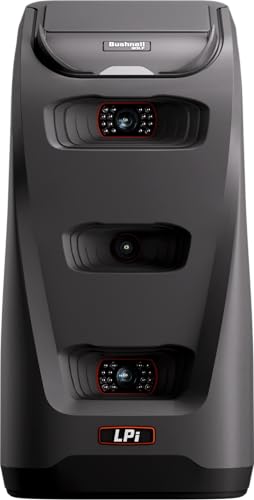
Bushnell Golf Launch Pro i, Circle B Edition
Tour-level photometric accuracy that becomes affordable at this tier, the step toward commercial-grade ball and club data.

Optoma UHD38x True 4K UHD Projector
A genuine 4K image at high brightness, sharper course detail than the 1080p projectors in lower tiers.

GoSports 10 x 8 ft Golf Simulator Enclosure
A full framed enclosure with screen and side netting sized for a true bay, a complete safe surround around the hitting area.

Real Feel Country Club Elite 4 x 5 ft Golf Mat
A commercial-grade mat that takes a real divot and protects your wrists over thousands of shots, the standard pros use.
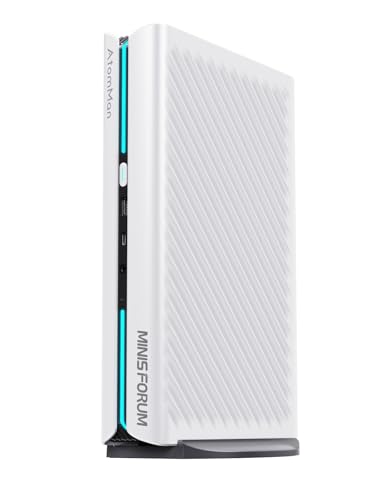
MINISFORUM G1 Pro Mini Gaming PC, RTX 4060
An RTX 4060 mini PC that drives 4K GSPro smoothly while tucking out of sight in the bay.
At $5,000 the launch monitor outclasses everything around it. At $7,500 the rest of the room finally catches up. You get a genuine 4K image instead of 1080p, a PC powerful enough to drive it, a mat you can hit down through like real turf, and a full enclosure with side netting rather than a screen and frame alone. The launch monitor can also climb a tier into Bushnell Launch Pro territory, getting you within reach of commercial-grade accuracy.
The under-$7,500 build at a glance
| Component | Pick | Upgrade over the $5,000 tier | Price |
|---|---|---|---|
| Launch monitor | SkyTrak ST MAX | Same proven core, more budget elsewhere | $1,995.00 |
| Accuracy upgrade | Bushnell Launch Pro i | Tour-level data, optional swap | $1,499.99 |
| Projector | Optoma UHD38x | True 4K instead of 1080p | $999.00 |
| Enclosure | GoSports 10 x 8 ft | Full framed surround with side netting | $999.99 |
| Hitting mat | Real Feel Country Club Elite | Commercial mat, takes a real divot | $479.00 |
| Computer | MINISFORUM G1 Pro (RTX 4060) | Drives 4K GSPro smoothly | $1,439.90 |
With the SkyTrak core, the build comes to roughly $5,910 before software, leaving headroom toward the $7,500 cap for GSPro or E6 licensing, proper flooring, and bias lighting. Model the full first-year cost, including recurring fees, in our golf simulator cost calculator.
Launch monitor: SkyTrak ST MAX or Bushnell Launch Pro
The SkyTrak ST MAX remains the value-smart core, a photometric unit with dual-Doppler radar that keeps the budget balanced across the whole room. If launch-monitor accuracy is your priority, the Bushnell Launch Pro i Circle B becomes affordable at this tier and delivers tour-level ball and club data that approaches commercial systems. Both are camera based and both want an annual subscription for full course play, so the choice comes down to whether you spread the money evenly or concentrate it in the sensor. Compare them head to head in our best launch monitors guide.
Optoma UHD38x (Best Projector)
This is where the image jumps from good to great. The UHD38x is a true 4K UHD projector that renders fairway grain, distant pins, and HDR shadows with detail a 1080p unit cannot match, and it stays bright enough for a room with some ambient light. It is a standard-throw design, so plan its mount distance carefully against your screen width using our projector throw calculator, or pick a short-throw 4K alternative from our best golf simulator projectors roundup if your room is tight.
Enclosure, commercial mat, and RTX 4060 PC
The GoSports 10 by 8 ft enclosure wraps the hitting area in a full framed surround with side netting, containing mishits and making the bay feel like a dedicated room. The Real Feel Country Club Elite mat is the centerpiece upgrade: a commercial surface you can hit down through with a realistic divot-style strike, protecting your wrists over thousands of shots. The MINISFORUM G1 Pro packs an RTX 4060 into a compact case that drives 4K GSPro smoothly and hides out of sight. For a wider mat comparison, see our best golf hitting mats guide.
How we chose
We did not assemble this build in a test bay. We compared published manufacturer specifications, launch-monitor sensor type and accuracy claims, projector resolution and brightness, enclosure and screen dimensions, mat construction, and PC GPU class, then weighed them against patterns in verified owner reviews on Amazon. We chose parts that balance against each other so no single component bottlenecks the rest.
We were candid about subscriptions and throw geometry. Both launch monitors need annual software for full simulation, and the 4K projector here is standard throw, so it demands more room depth than a short-throw unit. We flagged both rather than burying them. All prices and specs come from manufacturer listings, so treat them as estimates and confirm your room dimensions before buying.
Buying tips for a sub-$7,500 simulator
Decide your priority before you spend. If you want the most balanced room, keep the SkyTrak core and put the savings into the 4K projector, commercial mat, and proper flooring. If trustworthy data matters most, swap to the Bushnell Launch Pro and trim elsewhere. Either way, do not pair a 4K projector with an underpowered PC: the RTX 4060 here is the minimum that keeps 4K GSPro smooth.
Treat the room as a permanent install. A comfortable bay is about 12 ft wide, 15 ft deep, and 10 ft tall, and both-handed play needs 15 ft of width or more. A true 4K projector and full enclosure assume a dedicated space, so confirm your ceiling clears a full driver swing and verify the layout with our room size calculator. For complete pre-built options at this level, compare our best golf simulator packages and best enclosures guides.
Golf Sim Build Planner
Room-fit worksheet, gear checklist, budget tracker, and wiring and lighting plan, in one printable planner that takes your build from idea to first swing.
Frequently Asked Questions
What does an extra $2,500 buy over a $5,000 simulator?
At $7,500 the picture and the bay catch up to the launch monitor. You move from a 1080p projector to a true 4K unit, from a budget laptop to an RTX 4060 PC that drives 4K smoothly, from a thin pad to a commercial Real Feel mat that takes a real divot, and to a full framed enclosure with side netting. The launch monitor can also step up toward the Bushnell Launch Pro class.
Should I pick SkyTrak or the Bushnell Launch Pro at this budget?
Both are photometric. The SkyTrak ST MAX is the proven value core and leaves more budget for the 4K projector and full enclosure. The Bushnell Launch Pro i delivers tour-level data accuracy that gets close to commercial units and becomes affordable here, but its full simulation features require an annual subscription. Choose SkyTrak to spread the budget evenly, or Bushnell if launch-monitor accuracy is your top priority.
Is a 4K projector worth it for a golf simulator?
At this budget, yes. A true 4K projector like the Optoma UHD38x renders course detail, grain, and distant fairways far more cleanly than 1080p, especially on a large impact screen viewed from a few feet away. It also pairs better with a capable RTX 4060 PC. Below roughly $5,000 the money is better spent on the launch monitor, but at $7,500 the image quality upgrade is genuinely noticeable.
Does the Bushnell Launch Pro need a subscription?
Yes for full simulation. The Launch Pro reads data out of the box, but unlocking simulation modes and course play through Bushnell's platform requires a paid plan, and connecting it to GSPro or E6 Connect carries separate licensing. Factor an annual software cost into your total. Our cost calculator lets you add recurring fees so the $7,500 figure reflects what you will actually spend the first year.
Why a commercial mat instead of a cheaper turf pad?
A commercial mat like the Real Feel Country Club Elite lets you hit down through the ball and take a realistic divot-style strike without the club bouncing or jarring your wrists. Thin foam pads encourage a sweeping, fat-shot-forgiving motion that does not translate to the course and wears out fast under heavy use. At this budget the mat is a long-term investment that protects both your swing and your joints.
What room do I need for a $7,500 setup?
Plan a comfortable bay of about 12 ft wide, 15 ft deep, and 10 ft of ceiling, and if anyone plays both right and left handed, push width to 15 ft or more. A true 4K projector and full enclosure assume a dedicated room rather than a shared garage corner. Confirm clearance for a full driver swing and verify the fit with our room size calculator before committing to a permanent install.
Building a golf sim?
Use our free calculators and guides to size the room, the gear, and the budget.
Build Planner: $39